Parents advised on managing student device distractions
Strategies include using built-in tools, creating routines, and employing time-management techniques.
AI-assisted coverage comparison, editor-supervised · How this was made
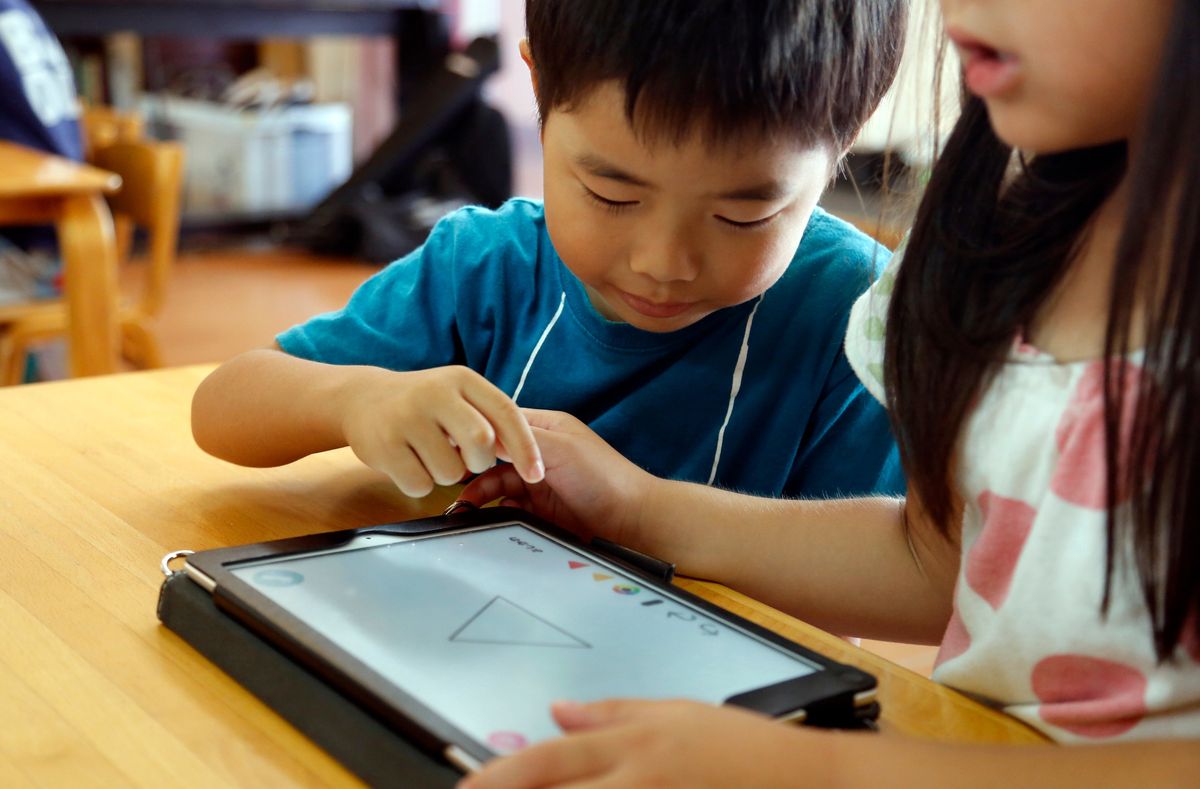
Parents advised on managing student device distractions
Photograph: My Mother Lode (embedded from source)
What this story says
- Tablets and computers are vital for education but present distractions like games and social media.
- Parents face challenges managing children's focus on school-issued devices with limited parental controls.
- Strategies to mitigate distractions include device settings, routines, and time management techniques.
- Battle Ground Public Schools in Washington implemented overnight login restrictions for school Chromebooks.
Who covered it
Percentages are shares of the 43 outlets carrying a published leaning rating. 5 of the 48 outlets we know ran this story carry no rating and are not counted in them. Coverage measured .
Trust
42/100
Craft
65/100
Hype
10/100
48 sources · methodology
Missing from the right
Only 3 of the 43 outlets with a published leaning rating that ran this story are rated right.
A reader who follows the right would not have seen this. We report the absence rather than explain it: outlets choose what to cover for many reasons, and we have no evidence about which one applies here.
Tablets and computers have become essential tools for students, but they also offer distractions such as games, social media, and web browsing. Parents find it difficult to help children stay focused on these devices, particularly when they are school-issued and have restricted parental controls. Solutions involve using built-in device features, establishing consistent routines, and implementing time management strategies.
The approach to managing distractions can differ based on whether students use personal or school-issued devices. Parents have more control over personal devices, allowing them to block websites or remove apps. School-issued devices often come with pre-installed software and managed settings. Parents can consult school administrators about existing controls and available options for managing screen time. Some schools provide additional tools for parents, such as Battle Ground Public Schools in Washington, which introduced overnight login restrictions for elementary and middle school students' Chromebooks due to concerns about late-night usage affecting sleep.
To reduce distractions, parents can utilise device settings. Apple devices offer 'focus modes' like Do Not Disturb, which can silence notifications. Android devices have a similar feature and a focus mode within Digital Wellbeing that can pause selected apps. Parents can also use built-in controls on both platforms to regulate screen time, restrict access to certain app categories, or set daily limits for individual applications. Tools like Google's Family Link and Apple's Family Sharing can assist in managing these settings. However, these limits are not always foolproof, as children may be able to request additional time or override restrictions. If specific settings are unavailable, parents may need to check the school's device policy or contact the district's technology department. A simple low-tech solution is to delete consistently distracting apps.
Beyond device settings, experts suggest parents help children develop their own attention management skills. This includes identifying periods when students are most alert and scheduling demanding tasks accordingly. Creating a quiet workspace and avoiding multitasking, such as texting while reading, can also improve focus. Experts note that quick attention shifts hinder learning and retention. Becoming more conscious of one's actions can lead to intentionality and planning. Setting goals and rewarding accomplishments can further aid focus. Starting homework earlier in the day, after a period of decompression, is also recommended, as late-night work can interfere with sleep.
Disagreements in reporting
All 27 reports agree that tablets and computers are essential school supplies that can also be distracting. They also agree that parents face challenges in managing children's focus on devices, especially school-issued ones, and that strategies include using built-in device tools, creating routines, and employing time-management techniques. The reports also align on the example of Battle Ground Public Schools implementing overnight login restrictions for school-issued Chromebooks and on the existence of 'focus modes' on Apple and Android devices.
What the coverage left out
None of the 27 reports mention specific figures for the number of students affected by device distractions or the cost of school-issued devices to districts. The reports also do not detail any specific parental concerns beyond those related to late-night usage and sleep interruption, as cited by Battle Ground Public Schools.
Coverage settled. We checked this 7 times and stopped on 1 Sept 2026, 16:45. The figures above are what it finished at.
How each side covered it
Our own reading of the reporting listed below, written from the outlets’ articles rather than quoted from them. The reasoning is set out on our methodology page.
Left
19 rated outlets
- Thirteen left-rated reports led on the idea that tablets and computers, while crucial for education, also present distractions. They highlighted the challenges parents face in keeping children focused, particularly on school-managed devices. These reports detailed strategies such as using built-in device tools, establishing routines, and employing time-management techniques. The implementation of overnight login restrictions for school-issued Chromebooks by Battle Ground Public Schools in Washington was also a common point. The reports mentioned Apple's 'focus modes' and Android's similar features within Digital Wellbeing as ways to manage distractions.
Centre
21 rated outlets
- Eleven centre-rated reports focused on the dual nature of tablets and computers as essential school supplies that can also be distracting. They noted the difficulties parents encounter in helping children stay focused, especially with school-issued devices that may have limited parental controls. These reports outlined strategies including the use of built-in device tools, the creation of routines, and the application of time-management techniques. The example of Battle Ground Public Schools introducing overnight login restrictions for school Chromebooks was also featured. The availability of 'focus modes' on Apple and Android devices was mentioned as a method to manage notifications and app usage.
Right
3 rated outlets
- The single right-rated report led on the topic of how parents can help children stay focused on school devices. It noted that tablets and computers are crucial for education but can also be distracting. The report mentioned that parents face challenges in managing children's focus, particularly with school-issued devices. It also highlighted strategies such as using built-in device tools, creating routines, and employing time-management techniques.
Questions about this coverage
- How did the left and right cover Parents advised on managing student device distractions?
- Of the 43 outlets on this story carrying a published leaning rating, 44% are rated left, 49% are rated centre, 7% are rated right. Those percentages are shares of the rated outlets, not of every outlet that ran it, which was 48. The sections above set out what each side emphasised, in its own terms.
- Is Parents advised on managing student device distractions left or right?
- Neither side dominates it. Of the 43 rated outlets on this story, 44% are rated left, 49% are rated centre, 7% are rated right, and no side holds the 70% this site would want before calling a field one-sided. A story is not left or right in any case; the outlets that carried it are what carry ratings.
- Is the coverage of Parents advised on managing student device distractions biased?
- Parents advised on managing student device distractions is one event reported by 48 outlets, and this page does not rate the story as biased or unbiased. What it publishes is the spread: which outlets ran it, where named rating organisations place each of them on the spectrum, and what each side chose to lead with. A leaning rating describes an outlet's record over time, not this article, and the two should not be run together.
- Which side is not reporting Parents advised on managing student device distractions?
- When we first saw this story, outlets rated right had barely covered it. Coverage accretes for hours after an event, so that is where to look rather than a verdict — the split above is the current count, and it is the one to read.
- Which outlets covered Parents advised on managing student device distractions?
- 48 that we know of, every one of them listed further up this page with a link to its own report and to what we hold on the publisher. Nothing here is a summary of somebody else's summary: the outlets are named so the original reporting can be read.
- How can parents manage distractions on school-issued devices?
- Parents can use built-in device tools like 'focus modes' or 'Do Not Disturb' to limit notifications and app access. Establishing consistent routines and teaching time-management techniques are also recommended. Consulting with school administrators about available controls and policies is advised.
- What strategies can help children stay focused on school devices?
- Strategies include utilising device settings to silence notifications and pause distracting apps. Parents can also help children learn to manage their own attention by scheduling demanding tasks during alert periods and creating a dedicated workspace. Deleting consistently distracting apps is another option.
- What is an example of a school implementing device restrictions?
- Battle Ground Public Schools in Washington implemented overnight login restrictions for school-issued Chromebooks for elementary and middle school students. This measure was introduced in response to parent concerns about late-night device usage potentially disrupting sleep.
Read it at the source
48 outlets, grouped by the leaning a published rating gives them. Every headline links to the original; an underlined outlet name opens our profile of that publisher.
Left
19- One Tech Tip: How to keep your child’s tablets, laptops from becoming distractions from schoolwork (opens Daily Record in a new tab)
Daily Record — is Daily Record biased? Our profile of this outlet
- One Tech Tip: How to keep your child’s tablets, laptops from becoming distractions from schoolwork (opens Richmond Register in a new tab)
Richmond Register — is Richmond Register biased? Our profile of this outlet
- One Tech Tip: How to keep your child’s tablets, laptops from becoming distractions from schoolwork (opens Kokomo Tribune in a new tab)
Kokomo Tribune — is Kokomo Tribune biased? Our profile of this outlet
- How to keep kids on task at school when using these crucial, but distracting, devices (opens Fast Company in a new tab)
Fast Company — is Fast Company biased? Our profile of this outlet
- How To Keep Your Kids Focused And Safe From Online Distractions As School Starts (opens HuffPost UK in a new tab)
HuffPost UK — is HuffPost UK biased? Our profile of this outlet
- How to keep your child’s tablets, laptops from becoming distractions from schoolwork (opens NBC Dallas-Fort Worth in a new tab)
NBC Dallas-Fort Worth — is NBC Dallas-Fort Worth biased? Our profile of this outlet
- One Tech Tip: How to keep your child’s tablets, laptops from becoming distractions from schoolwork (opens thealbertan.com in a new tab)
thealbertan.com — is thealbertan.com biased? Our profile of this outlet
- One Tech Tip: How to keep your child’s tablets, laptops from becoming distractions from schoolwork (opens St Catharines Standard in a new tab)
St Catharines Standard — is St Catharines Standard biased? Our profile of this outlet
Show 11 more
- One Tech Tip: How to keep your child’s tablets, laptops from becoming distractions from schoolwork (opens Bowen Island Undercurrent in a new tab)
Bowen Island Undercurrent — is Bowen Island Undercurrent biased? Our profile of this outlet
- One Tech Tip: How to keep your child’s tablets, laptops from becoming distractions from schoolwork (opens Rocky Mountain Outlook in a new tab)
Rocky Mountain Outlook — is Rocky Mountain Outlook biased? Our profile of this outlet
- One Tech Tip: How to keep your child’s tablets, laptops from becoming distractions from schoolwork (opens The Toronto Star in a new tab)
The Toronto Star — is The Toronto Star biased? Our profile of this outlet
- One Tech Tip: How to keep your child’s tablets, laptops from becoming distractions from schoolwork (opens Oskaloosa Herald in a new tab)
Oskaloosa Herald — is Oskaloosa Herald biased? Our profile of this outlet
- One Tech Tip: How to keep your child’s tablets, laptops from becoming distractions from schoolwork (opens El Paso Inc. in a new tab)
El Paso Inc. — is El Paso Inc. biased? Our profile of this outlet
- One Tech Tip: How to keep your child’s tablets, laptops from becoming distractions from schoolwork (opens Beckley Register-Herald in a new tab)
Beckley Register-Herald — is Beckley Register-Herald biased? Our profile of this outlet
- One Tech Tip: How to keep your child’s tablets, laptops from becoming distractions from schoolwork (opens The Independent (US) in a new tab)
The Independent (US) — is The Independent (US) biased? Our profile of this outlet
- One Tech Tip: How to keep your child’s tablets, laptops from becoming distractions from schoolwork (opens Associated Press News in a new tab)
Associated Press News — is Associated Press News biased? Our profile of this outlet
- One Tech Tip: How to keep your child’s tablets, laptops from becoming distractions from schoolwork (opens The Independent in a new tab)
The Independent — is The Independent biased? Our profile of this outlet
- One Tech Tip: How to keep your child’s tablets, laptops from becoming distractions from schoolwork (opens The Record in a new tab)
The Record — is The Record biased? Our profile of this outlet
- One Tech Tip: How to keep your child’s tablets, laptops from becoming distractions from schoolwork (opens The Hamilton Spectator in a new tab)
The Hamilton Spectator — is The Hamilton Spectator biased? Our profile of this outlet
Centre
21- One Tech Tip: How to keep your child’s tablets, laptops from becoming distractions from schoolwork (opens KPBS in a new tab)
- One Tech Tip: How to keep your child’s tablets, laptops from becoming distractions from schoolwork (opens CTV News in a new tab)
- One Tech Tip: How to keep your child’s tablets, laptops from becoming distractions from schoolwork (opens The Record in a new tab)
The Record
- How to keep your child’s tablets, laptops from becoming distractions from schoolwork (opens The Norfolk Daily News in a new tab)
The Norfolk Daily News — is The Norfolk Daily News biased? Our profile of this outlet
- One Tech Tip: How to keep your child’s tablets, laptops from becoming distractions from schoolwork (opens Herald Bulletin in a new tab)
Herald Bulletin — is Herald Bulletin biased? Our profile of this outlet
- One Tech Tip: How to keep your child’s tablets, laptops from becoming distractions from schoolwork (opens LancasterOnline in a new tab)
LancasterOnline — is LancasterOnline biased? Our profile of this outlet
- One Tech Tip: How to keep your child’s tablets, laptops from becoming distractions from schoolwork (opens Rutland Herald in a new tab)
Rutland Herald — is Rutland Herald biased? Our profile of this outlet
- One Tech Tip: How to keep your child’s tablets, laptops from becoming distractions from schoolwork (opens Chronicle Online in a new tab)
Chronicle Online — is Chronicle Online biased? Our profile of this outlet
Show 13 more
- One Tech Tip: How to keep your child’s tablets, laptops from becoming distractions from schoolwork (opens union-bulletin.com in a new tab)
union-bulletin.com — is union-bulletin.com biased? Our profile of this outlet
- One Tech Tip: How to keep your child’s tablets, laptops from becoming distractions from schoolwork (opens Pittsburgh Post-Gazette in a new tab)
Pittsburgh Post-Gazette — is Pittsburgh Post-Gazette biased? Our profile of this outlet
- One Tech Tip: How to keep your child’s tablets, laptops from becoming distractions from schoolwork (opens WWAY TV in a new tab)
- One Tech Tip: How to keep your child’s tablets, laptops from becoming distractions from schoolwork (opens My Mother Lode in a new tab)
My Mother Lode — is My Mother Lode biased? Our profile of this outlet
- One Tech Tip: How to keep your child's tablets, laptops from beco (opens WBAL in a new tab)
- One Tech Tip: How to keep your child’s tablets, laptops from becoming distractions from schoolwork (opens Cherokee Tribune Ledger News in a new tab)
Cherokee Tribune Ledger News — is Cherokee Tribune Ledger News biased? Our profile of this outlet
- One Tech Tip: How to keep your child’s tablets, laptops from becoming distractions from schoolwork (opens Yakima Herald-Republic in a new tab)
Yakima Herald-Republic — is Yakima Herald-Republic biased? Our profile of this outlet
- One Tech Tip: How to keep your child’s tablets, laptops from becoming distractions from schoolwork (opens Weatherford Democrat in a new tab)
Weatherford Democrat — is Weatherford Democrat biased? Our profile of this outlet
- One Tech Tip: How to keep your child’s tablets, laptops from becoming distractions from schoolwork (opens The Northern Virginia Daily in a new tab)
The Northern Virginia Daily — is The Northern Virginia Daily biased? Our profile of this outlet
- One Tech Tip: How to keep your child’s tablets, laptops from becoming distractions from schoolwork (opens Ottumwa Courier in a new tab)
Ottumwa Courier — is Ottumwa Courier biased? Our profile of this outlet
- One Tech Tip: How to keep your child’s tablets, laptops from becoming distractions from schoolwork (opens KHQ Right Now in a new tab)
KHQ Right Now — is KHQ Right Now biased? Our profile of this outlet
- One Tech Tip: How to keep your child’s tablets, laptops from becoming distractions from schoolwork (opens WKMG in a new tab)
- One Tech Tip: How to keep your child’s tablets, laptops from becoming distractions from schoolwork (opens Winnipeg Free Press in a new tab)
Winnipeg Free Press — is Winnipeg Free Press biased? Our profile of this outlet
Right
3- One Tech Tip: How to keep your child’s tablets, laptops from becoming distractions from schoolwork (opens Jonesboro Sun in a new tab)
Jonesboro Sun — is Jonesboro Sun biased? Our profile of this outlet
- How parents can help kids stay focused on school devices (opens Daily Sabah in a new tab)
Daily Sabah — is Daily Sabah biased? Our profile of this outlet
- One Tech Tip: How to keep your child’s tablets, laptops from becoming distractions from schoolwork (opens Daily Jefferson County Union in a new tab)
Daily Jefferson County Union — is Daily Jefferson County Union biased? Our profile of this outlet
Not rated
5- One Tech Tip: How to keep your child’s tablets, laptops from becoming distractions from schoolwork (opens The Business Journal in a new tab)
The Business Journal — is The Business Journal biased? Our profile of this outlet
- How To Keep Your Kids Focused And Safe From Online Distractions As School Starts (opens onlinemarketingscoops.com in a new tab)
onlinemarketingscoops.com — is onlinemarketingscoops.com biased? Our profile of this outlet
- A Technology Tip: How to Prevent Tablets and Laptops From Distracting Your Child From Homework (opens Independent Español in a new tab)
Independent Español — is Independent Español biased? Our profile of this outlet
- How to keep child’s tablets, laptops from becoming distractions from schoolwork (opens Egyptian Gazette in a new tab)
Egyptian Gazette — is Egyptian Gazette biased? Our profile of this outlet
- One Tech Tip: How to keep your child’s tablets, laptops from becoming distractions from schoolwork (opens Airdrie City View in a new tab)
Airdrie City View — is Airdrie City View biased? Our profile of this outlet
How did this read?
About the coverage, not about the story. We do not ask whether you agree with what happened — we have no honest use for that answer.
More in Media
All Media →


Elsewhere on the site
 Conflict & Security•3 min readTaiwan monitors Chinese military drills near its coast
 Politics•2 min readDarline Graham and Annie Andrews spar over name in South Carolina Senate debate
 Business & Economy•3 min readAmazon in talks to buy Israeli AI startup Decart for $7 billion
 Politics•3 min readTom Emmer calls Democratic candidates communists on ABC's 'This Week'